Overview
Email Is Personal. Alexa Lives in the Living Room.
Email is one of the most intimate digital spaces we have — financial information, personal relationships, health records, private conversations. Alexa is a shared household device sitting in the most public room of the home.
Designing Alexa Email meant solving a fundamental tension: how do you bring a deeply personal experience into a shared ambient device — without compromising privacy, trust, or the simplicity that makes voice compelling? There was no playbook. We built one.
2.5B
Global email users (2018)
2M+
Projected linked accounts
Project Context
Working Backwards From the Customer
Alexa Email was part of a larger initiative called Alexa Connect — Amazon's strategy to make Alexa a proactive personal assistant by connecting her to real sources of personal data: email, calendar, SMS, and beyond. We started with email because it was the richest and most universally adopted data source, with 2.5 billion users worldwide.
The project used Amazon's Working Backwards methodology — we wrote the press release and FAQ before building anything. This forced clarity on what we were actually solving for customers before a single line of code was written.
"Alexa Connect saves customers time and energy, freeing them from tedious interactions with their personal information. Over time, Connect lets Alexa take care of the grunt-work associated with personal information management."
— Alexa Connect PR/FAQ, May 2018
Tenet 01
Privacy
Protecting customer data is paramount. Access to personal information is a big ask — we must handle credentials with care and never surprise users with what Alexa knows.
Tenet 02
Compelling Value
Access to personal information is a big ask. We must provide compelling, tangible value in return for that trust — or we don't deserve it.
Tenet 03
No Surprises
We carefully present what we learn in context so customers are never surprised or made uncomfortable by what Alexa knows. When in doubt, ask permission.
North Star
Alexa Sets You Free
Alexa becomes a proactive intermediary — not just helping customers navigate information by voice, but understanding it. She tells you when your flight is delayed, drafts replies in your voice, and always stays discreet.
The Problem
Four Tensions With No Easy Answers
Tension 01
Personal vs. Shared
Email is deeply private. Alexa is a household device used by multiple people. Every decision had to navigate this conflict without making the experience feel paranoid or cumbersome.
Tension 02
Convenience vs. Security
Voice's core value is frictionless access. Email security requires friction by design. We had to find the minimum viable friction — enough to protect, not enough to frustrate.
Tension 03
Voice-only vs. Multimodal
The design had to work on Echo Dot (no screen) just as well as Echo Show. What gets read aloud vs. displayed visually was a core design decision with real privacy consequences.
Tension 04
Multi-user Household
Voice profiles help identify speakers — but what about guests, children, or ambiguous cases? Each edge case required a graceful, human-centered fallback pattern.
"A good butler announces that you have a message. They don't read it aloud in front of the whole household."
Design Process
Building the Voice Identity Layer
My approach was to treat privacy as a first principle that shaped every interaction decision from the ground up — not a feature added at the end. The core of the system was the voice enrollment and identity model.
1
Map every privacy scenario
Created a comprehensive matrix of who could be in the room, what they could hear, and what the consequences of each privacy failure would be. This became the design constraint framework.
2
Design two voice enrollment options
Built guided phrase-reading enrollment (Option 1, high accuracy) and voice-command passive enrollment (Option 2, lower friction) to serve different user contexts and comfort levels.
3
Design the voice code security layer
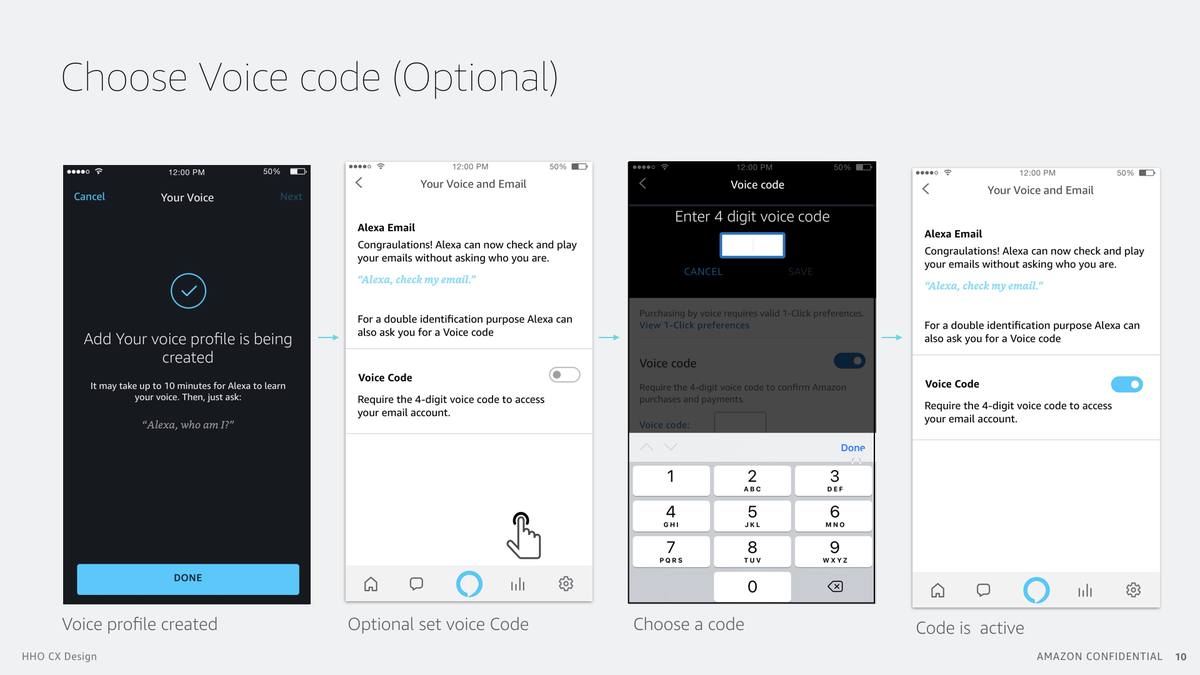
Designed an optional 4-digit voice code as a second authentication factor — providing security for users who needed it, without forcing friction on those who didn't.
4
Establish what gets spoken vs. displayed
For Echo Show: sender and subject on screen, body on demand. For voice-only: metadata first, content explicitly requested. The screen does privacy work that voice alone cannot.
5
Redline the full system
Produced detailed redlines for every screen state — identity confirmation, account linking (Google, Microsoft, Apple), email and calendar settings, voice restrictions, and voice code configuration — built to the Alexa Elements design system.
6
Align stakeholders through storytelling
Used scenario-based narratives to align senior stakeholders on the privacy model — showing specific household situations rather than abstract policy arguments.
Scenario & Storyboard
Mary Hears a Notification
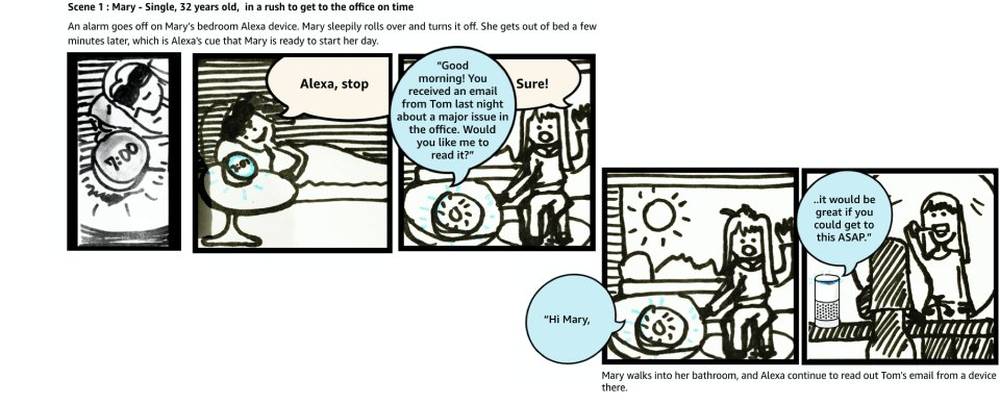
To ground the design, we built a core scenario: Mary hears an email notification on her phone while making breakfast. Instead of interrupting her flow, she asks Alexa — and stays in motion.
"Alexa, check my email." — Alexa responds: "You have two unread emails and one important email from Susan about the upcoming meeting." Mary asks Alexa to read it. Alexa reads while Mary continues cooking. If the email is long, Alexa pauses and asks if she should continue.
Alarm goes off, Mary stops it. Alexa proactively surfaces an important email from Tom. Mary asks Alexa to continue reading as she walks to the bathroom — the device follows her across surfaces.
This scenario defined the core design principle: Alexa should reduce cognitive load, not add to it. Every interaction decision — when to speak, when to wait, when to ask — was tested against this scenario.
Research & Testing
Online Interviews & Multimodal Prototypes
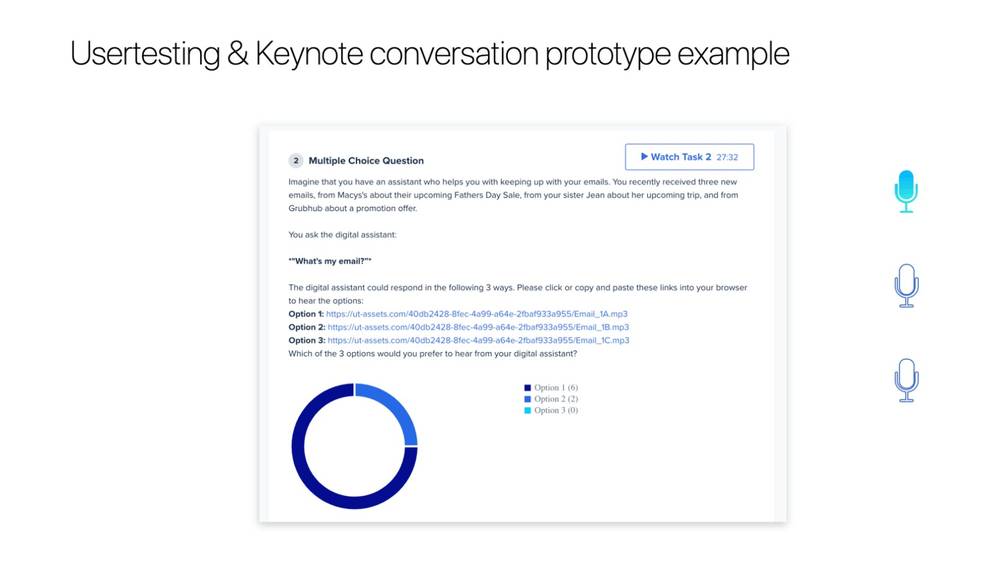
I developed Lo-Fi prototypes for initial dialogue creation, refining interactions through role-play sessions using Keynote conversation prototypes. I conducted tests with online users on UserTesting.com, iterating on dialogue variants to find the right balance of information density and naturalness.
Collaborating with linguistics experts, I tested three response pattern variants and asked users to choose which felt most natural. Option 1 won clearly (6/8 users) — establishing the response pattern that shipped.
Participants listened to 3 audio response options for "What's my email?" and voted. Option 1 (6/8) won — the more detailed, context-rich response. This directly validated the metadata-first approach.
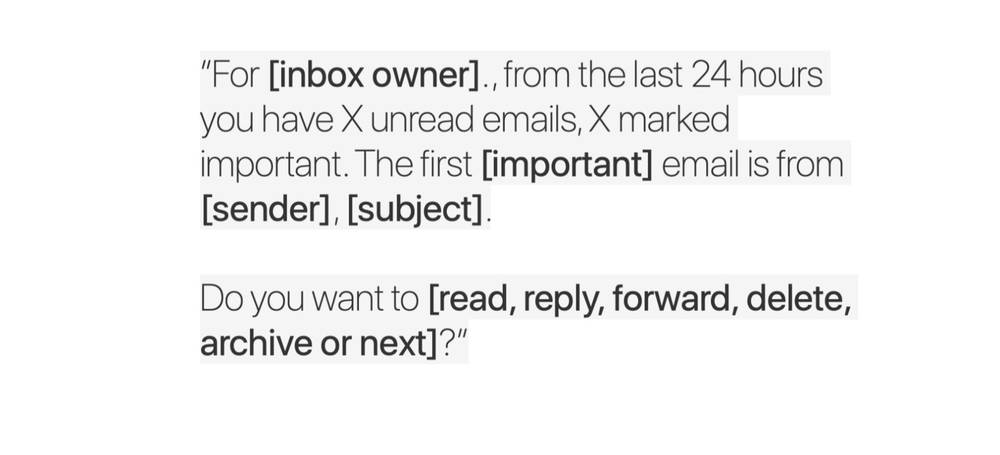
"For [inbox owner], from the last 24 hours you have X unread emails, X marked important. The first [important] email is from [sender], [subject]. Do you want to [read, reply, forward, delete, archive or next]?"
Design Artifacts — Voice Enrollment
Two Paths to Voice Identity
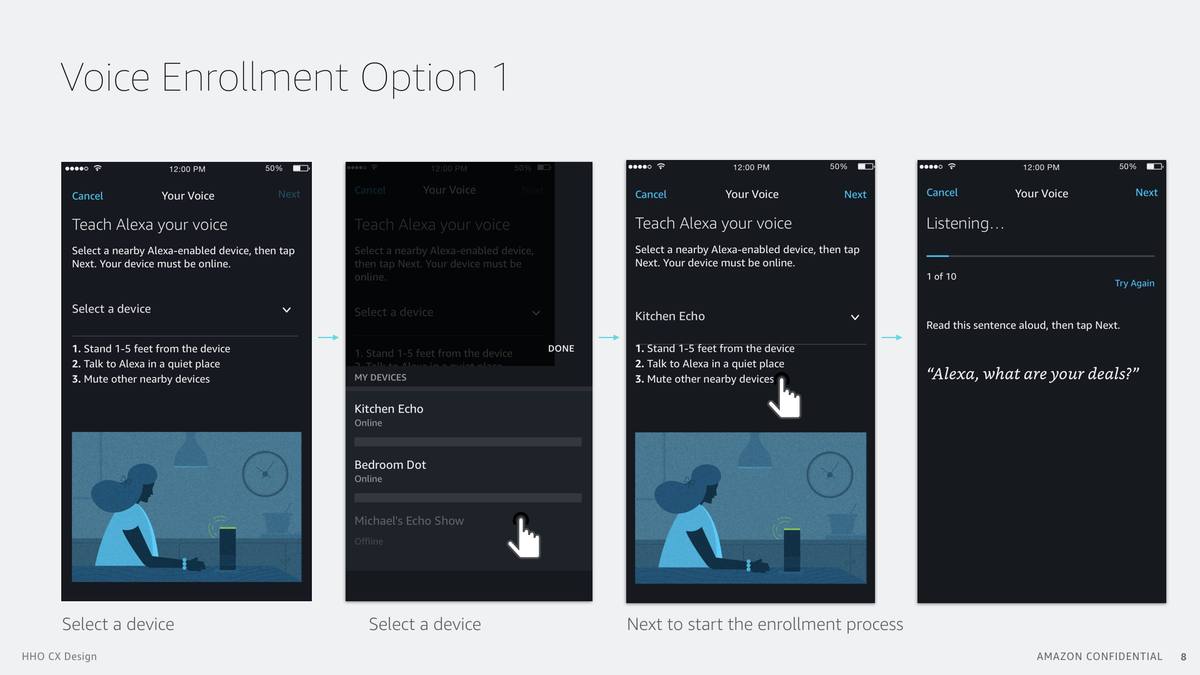
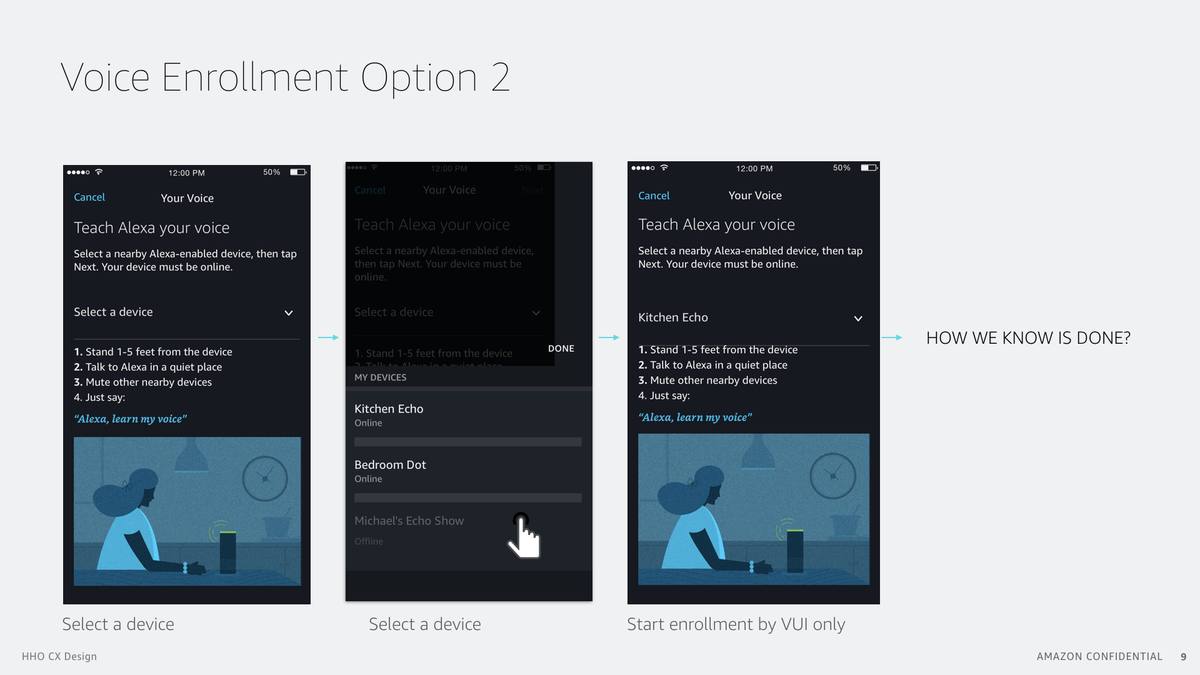
We designed two enrollment options. Option 1 guides users through reading 10 phrases aloud — high accuracy, explicit training. Option 2 starts enrollment with a single voice command — lower friction, lower barrier to entry.
Select a device → choose from household devices → tap Next to start → read 10 phrases aloud. High-accuracy enrollment for primary users. Last screen shows the "Listening..." state with a progress indicator and the phrase to read.
Say "Alexa, learn my voice" to start enrollment passively. Lower friction for secondary household users. The open design question — "HOW DO WE KNOW IT'S DONE?" — shows the honest challenges we were actively working through.
After enrollment, users can optionally set a 4-digit voice code as a second authentication factor for email access. Confirms "Alexa can now check and play your emails without asking who you are" — privacy protection without mandatory friction.
Design Artifacts — Redlines
The Full Identity & Settings System
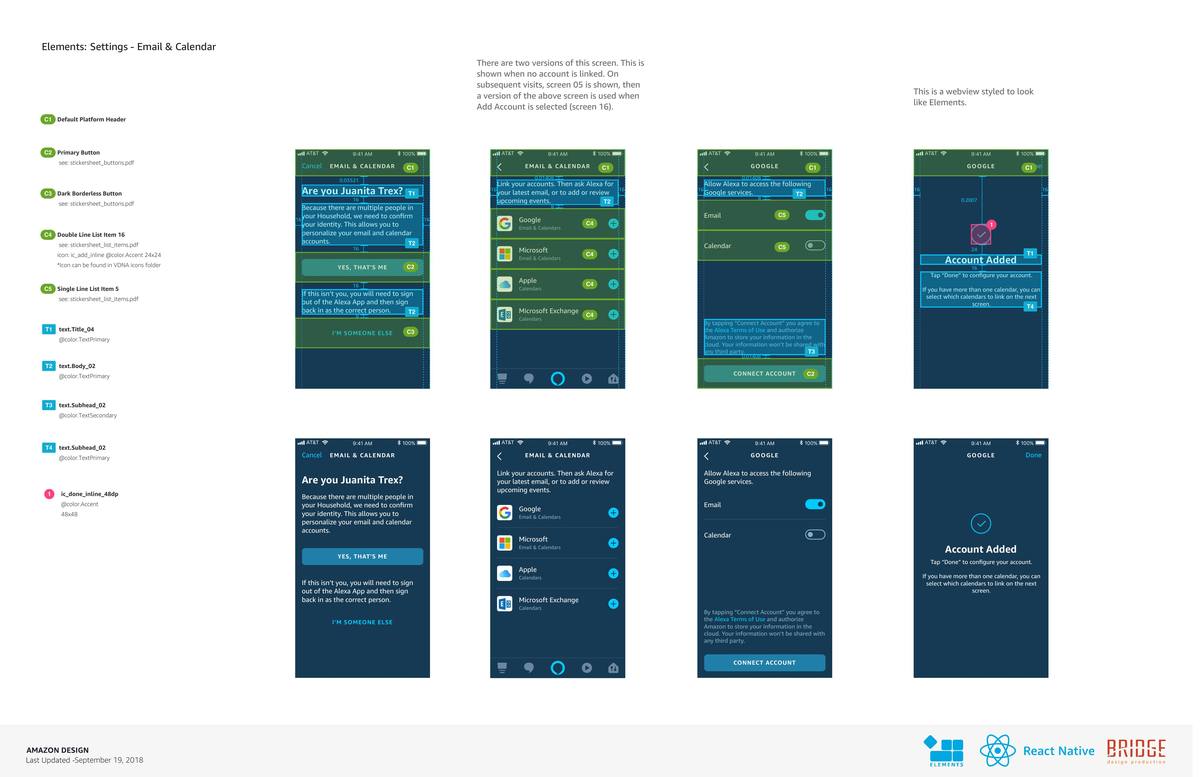
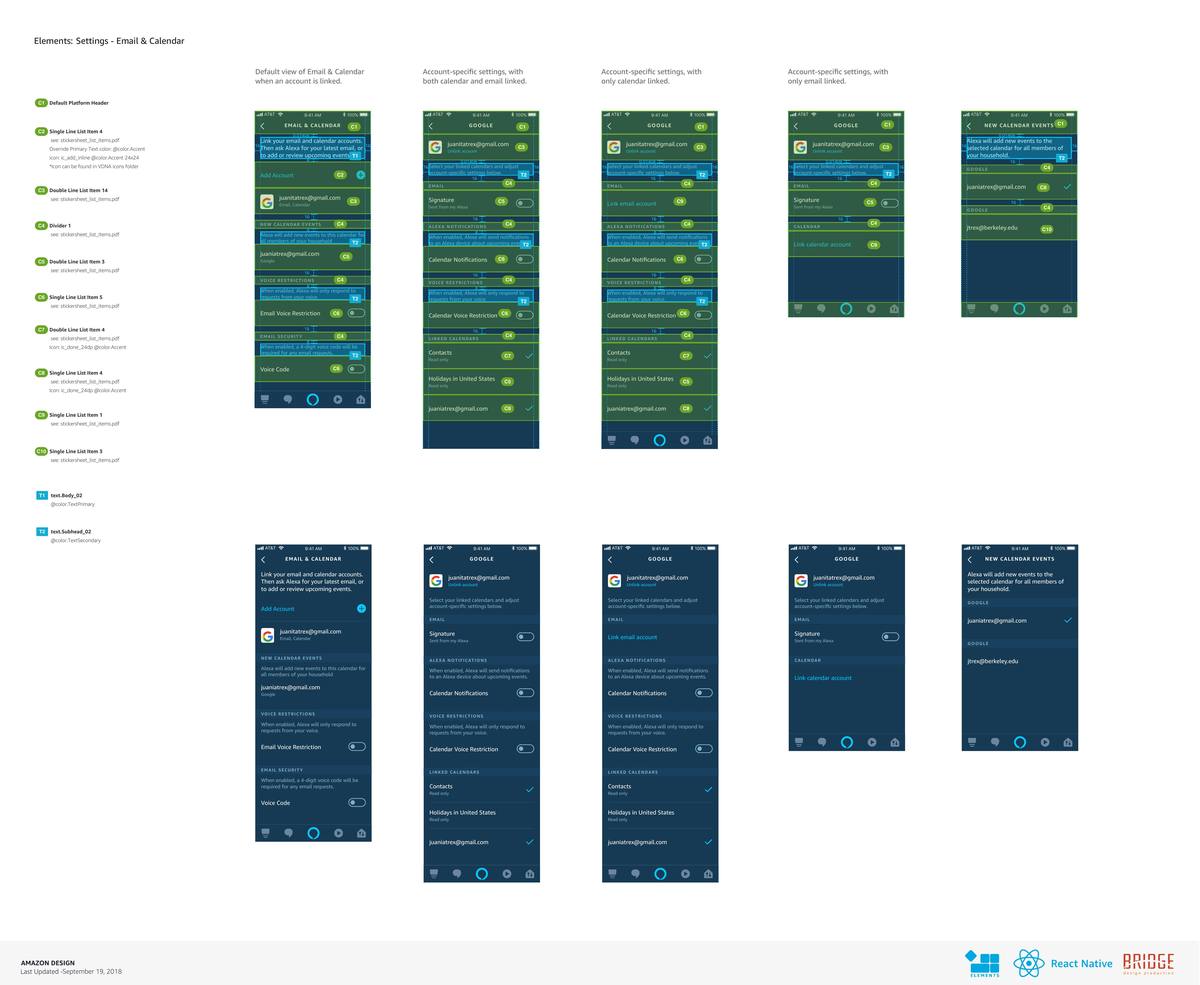
These redlines cover the complete system — from the household identity check through account linking, all email and calendar settings states, voice restrictions, and voice code configuration. Built to the Alexa Elements design system in React Native via Bridge.
Identity confirmation ("Are you Juanita Trex?"), account service selection (Google, Microsoft, Apple, Exchange), OAuth consent with data permissions, and account-added confirmation. Top row shows annotated redlines, bottom row shows clean final UI.
Five settings states: no account linked, both email and calendar linked, calendar only, email only, and new calendar events view. Each state shows account-specific settings including Alexa notifications, voice restrictions toggle, voice code, and linked calendar management.
Design Artifacts — Mobile App Screens
Account Settings & Email Access Controls
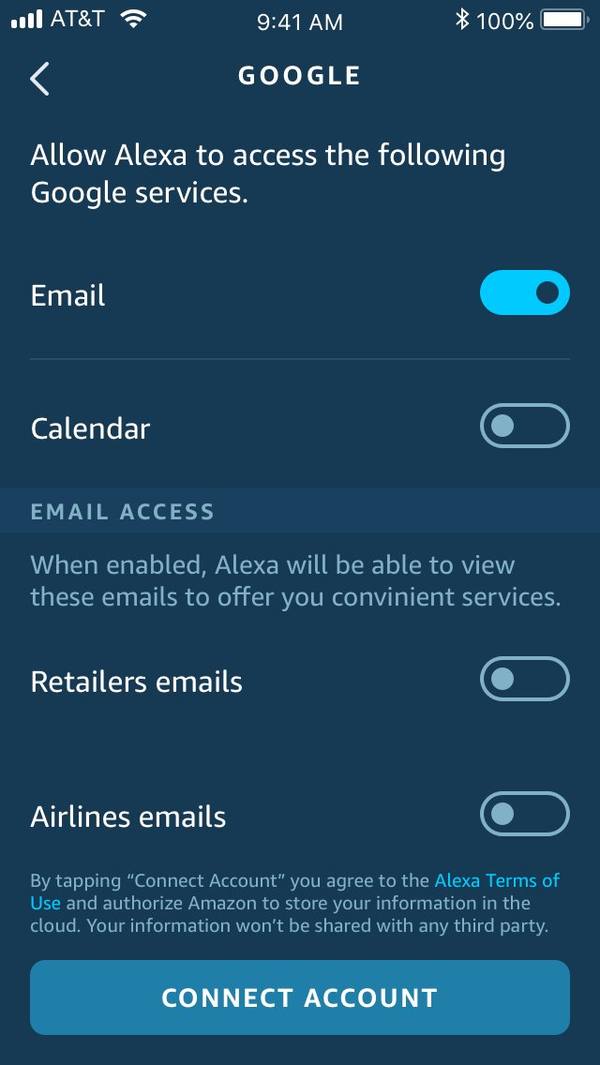
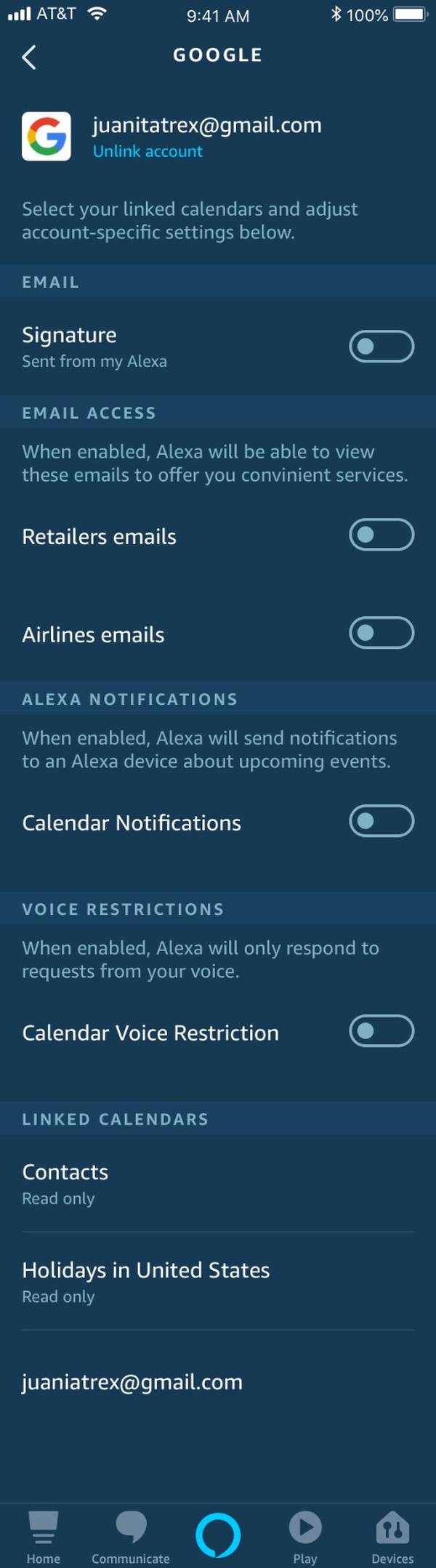
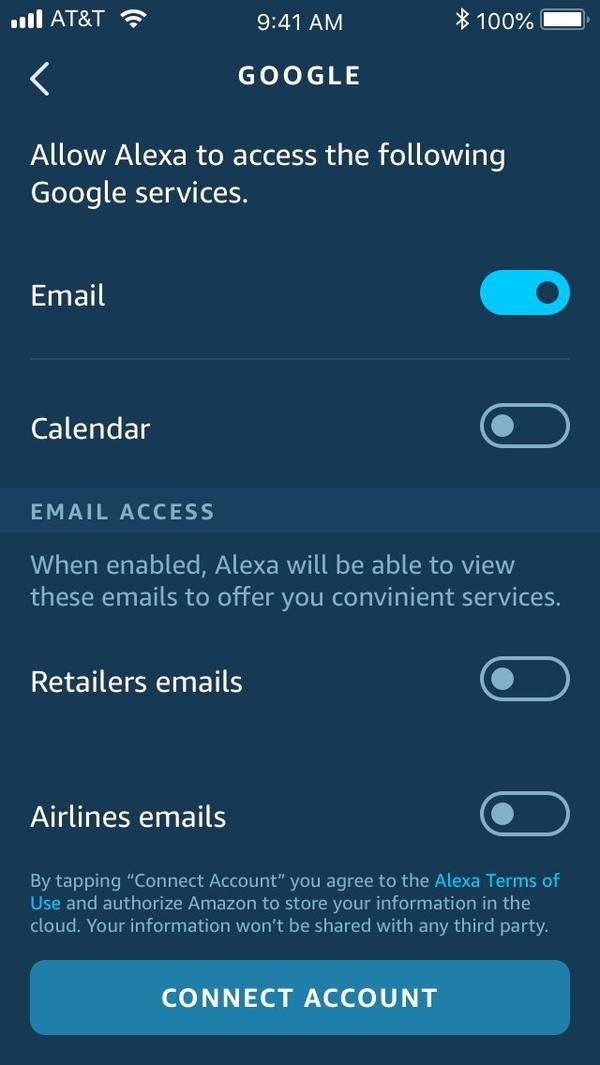
These are the actual production screens from the Alexa mobile app — showing the granular email access controls, account-specific settings, and the full post-linking settings state. This is the UI layer where users manage what Alexa can see and do with their email.
OAuth consent screen with granular email access toggles — retailers, airlines. Users control exactly what Alexa can see.
Post-linking settings: email signature, email access, Alexa notifications, voice restrictions, and linked calendars — all per-account.
Service-level toggles for email and calendar access — users choose which Google services Alexa can access before connecting.
Design Artifacts — Multimodal Echo Show
Voice + Screen: The Email Reading Experience
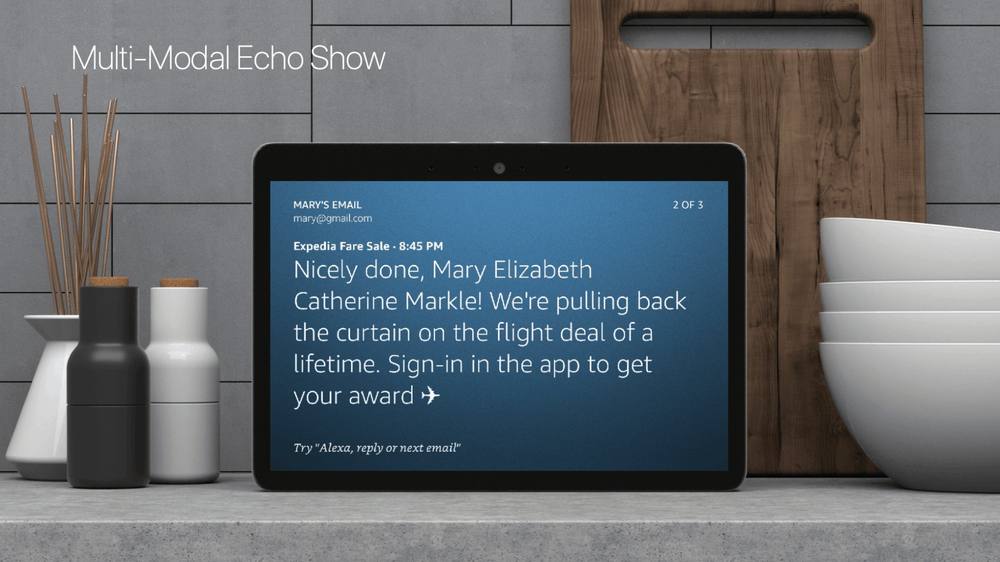
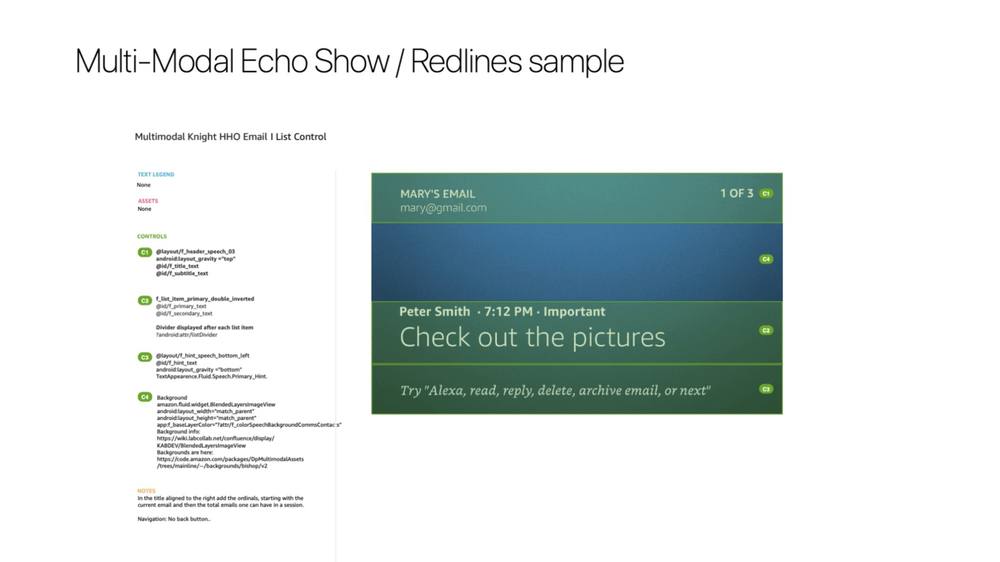
On Echo Show, email content is displayed visually while Alexa reads — reducing what gets spoken aloud in the room. The screen shows Mary's Email · 2 of 3 with the full email body, while a hint at the bottom teaches the voice navigation pattern: "Try: Alexa, reply or next email."
The screen shows the full email content while Alexa reads. Account identity ("Mary's Email ·
[email protected]") is persistent — always showing whose inbox is active. Voice hint at the bottom teaches navigation without interrupting the reading flow.
Production redlines for the Multimodal Knight HHO Email List Control — header component (C1), list item primary double inverted (C2), speech hint bottom left (C3), and blended background layer (C4). Sender, timestamp, and subject headline displayed in the priority view. Navigation hint: "Try: Alexa, read, reply, delete, archive email, or next."
Key Design Decisions
Privacy as an Interaction Principle
Metadata first, content on demand
Alexa announces sender and subject — never the body — until explicitly asked. Awareness without exposure.
Voice profiles as identity layer
Recognized voices get full access. Unrecognized voices get a graceful redirect — an invitation, not a failure.
Screen as privacy layer
On Echo Show, visual display replaces spoken content wherever possible — the screen does privacy work voice alone cannot.
Voice Design
The Golden Utterances
The VUI was designed around a list navigation paradigm — Alexa creates prioritized lists (important, new, waiting) from the inbox, and customers navigate with simple one-word commands. For long emails, Alexa reads the first 80 words then pauses — conversational, not overwhelming.
C: "Alexa, do I have any email?"
A: "You have 2 new emails, and 1 important email from Susan about Family Reunion."
C: "Read it."
A: "Susan says 'Did you have a chance to check out the summer camp info I sent?' Would you like to hear more?"
C: "No, delete it."
A: "OK, I archived it. Your first new email is from Gary about Bowling Shirts."
C: "Reply, 'Sounds great, looking forward to it!'"
A: "OK, I've sent 'Sounds great, looking forward to it.' You have no more new email."
Navigation commands: read · reply · delete · archive · next · previous · skip. Messages read in a 80-word preview — Alexa pauses and asks before continuing long emails.
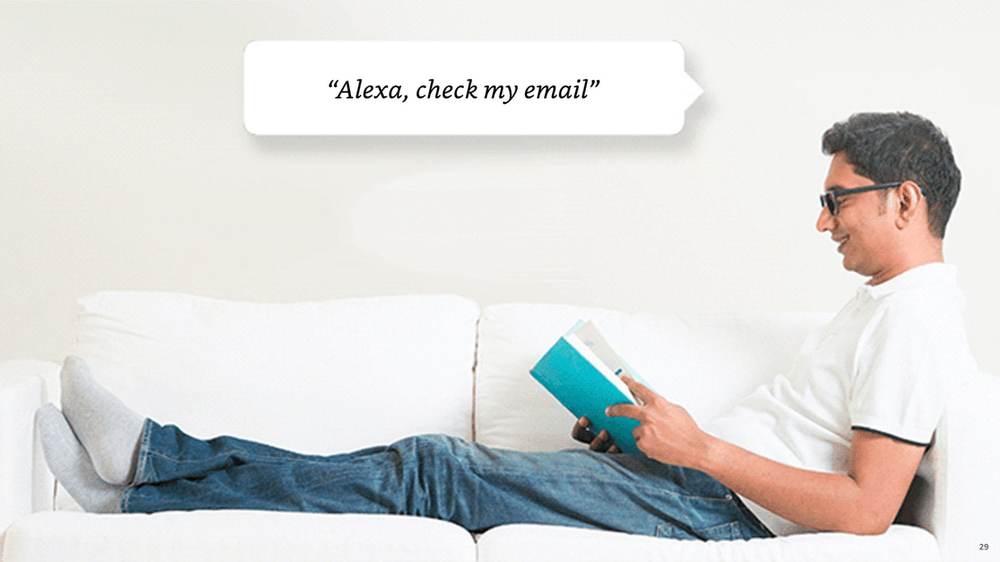
Golden Utterances — what users actually say
"Alexa, check my email"
"Alexa, read my emails"
"Alexa, who emailed me?"
"Alexa, next email"
"Alexa, read that"
"Alexa, learn my voice"
"Alexa, who am I?"
"Alexa, reply"
"Alexa, delete"
"Alexa, mark as read"
Outcome & Impact
What Shipped — and What It Established
Impact
Alexa Email shipped as part of the Alexa Household Organization suite — bringing voice-accessible personal email to 20M+ Alexa households with the first voice identity system at this scale.
The privacy framework — metadata-first, voice-profile gating, screen-as-privacy-layer, optional voice code — became a reusable pattern for other sensitive data features across the Alexa ecosystem.
The project proved that voice and privacy are not opposites. With the right interaction grammar, sensitive personal data can be made accessible by voice without compromising the trust users expect.
Reflection
What I'd Do Differently
I would invest more in longitudinal trust research — understanding how users' comfort with voice email evolved over weeks, not just at initial setup. Trust is built gradually, and our research was mostly point-in-time.
I'd also push harder for user-controlled privacy modes — letting users configure their own thresholds for what gets spoken vs. displayed. The system we shipped was a strong starting point; personalization is the right long-term answer.